One principle connects all three
A linear system obeys superposition: scaling and adding inputs scales and adds the corresponding outputs. A linear EQ can still reshape a waveform by filtering it. The curves here describe a narrower case: memoryless waveshaping, where each output sample is a function of the current input value. A nonlinear function can generate new spectral components. Saturation usually describes gentler, progressive bending; distortion usually describes more obvious reshaping; clipping describes a boundary beyond which peaks cannot continue normally.
These labels overlap. Ableton’s Saturator includes soft curves, hard curves and Digital Clip in one device. FabFilter Saturn 2 groups tape, tube, amp and destructive styles under “distortion.” The transfer curve and audible result matter more than the category name.
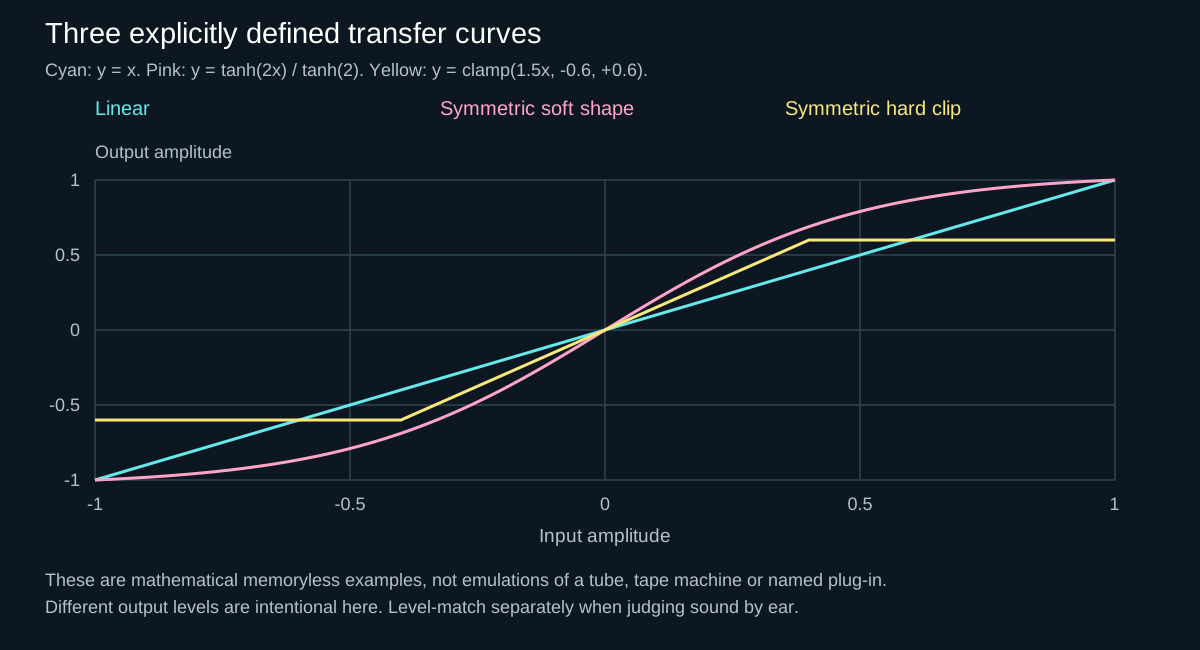
1. Use saturation when you want density and color
Saturation usually implies progressive nonlinear shaping, not necessarily a hard ceiling or an untouched quiet region. On a hard-techno kick it can add upper harmonics that make the body easier to hear on smaller speakers. On a rumble it can increase perceived density. On a drum bus it may soften isolated peaks while making the groove feel more connected.
Start with the drive low, compensate the output level, and listen for the moment the source becomes easier to read—not merely louder. If the transient loses its edge or the low end becomes cloudy, reduce drive, filter what enters the nonlinear stage, or process a parallel path.
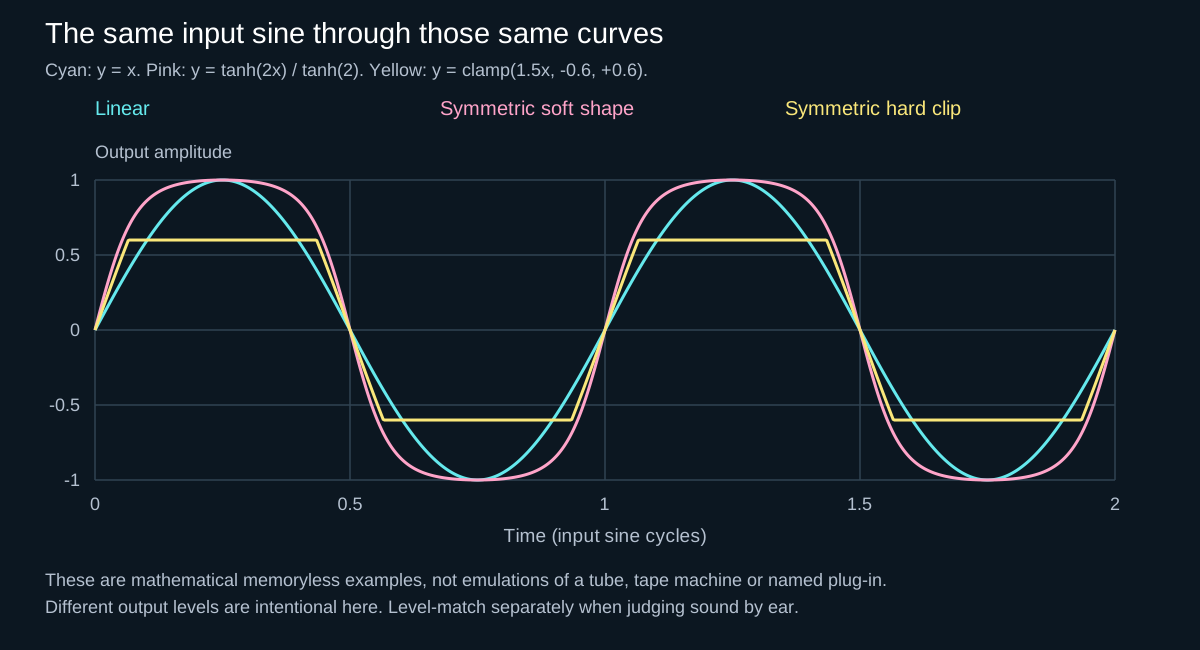
2. Use distortion when redesigning the timbre is the point
Heavier distortion affects more of the waveform and can turn a plain kick tail, synth or vocal into a new source. In hardcore, the interaction between pitch envelope, distortion curve and post-filtering often defines the kick more than the original sample.
Work in stages: shape the input first, distort, then remove what the distortion created but the arrangement does not need. Pre-filtering changes which frequencies enter the nonlinear stage; post-filtering changes its output, including newly generated components. Those operations generally do not commute. A post-EQ cannot simply undo the nonlinear result of a pre-EQ boost.
Distortion is not automatically “more saturation.” It is a broader creative decision: how much of the waveform is being redesigned, and for what role?
Check what the tone control actually controls
Saturn 2’s manual describes Tone as shaping the processed band, while Drive changes the level into its clipping stage. Its styles can include additional filtering, so a Tone label does not identify a universal pre-distortion EQ. In Live 12 Saturator, Color instead pairs a pre-shaper curve with an inverse post-shaper curve. The latter does not reverse the distortion: the signal has already passed through a nonlinear operation.
For a clear comparison, use an external EQ you can move before or after one unchanged shaper. Keep its frequency, gain and Q fixed, then compare the two orders at similar output loudness. Start with a modest move chosen for the sound. If a bass boost before distortion changes the midrange texture, reducing those same bass frequencies afterwards is not an equivalent experiment. The input-versus-output gain example demonstrates the simpler gain-only version of this distinction.
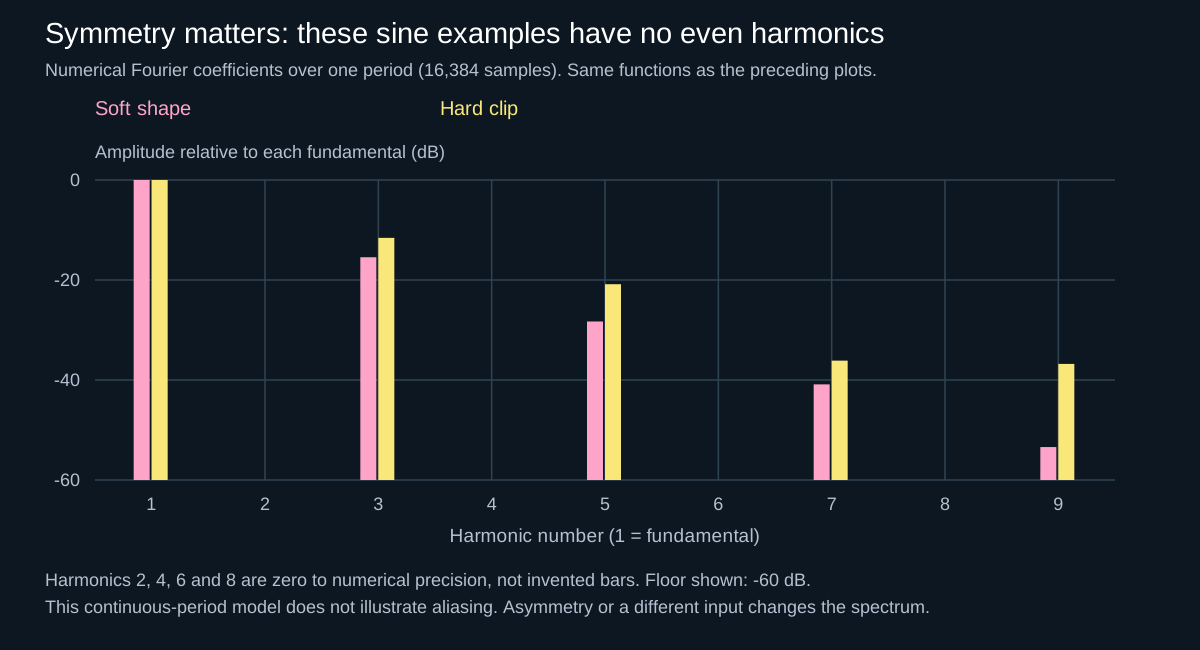
Harmonics depend on symmetry and the input
For a zero-DC sine wave, an odd-symmetric waveshaper satisfies f(−x) = −f(x) and generates only odd harmonics. That is why the calculated examples have no bars at harmonics 2, 4, 6 or 8. An asymmetric curve or offset can produce even harmonics. A kick or chord is not a single sine: multiple input frequencies can also generate intermodulation products, not just multiples of one fundamental.
Why distorting a bus differs from distorting each source
Here is a deliberately simple calculation, independent of any commercial plug-in. Add two sine waves at 70 and 113 Hz, each with normalized peak amplitude 0.2, then apply f(x) = x − x³/3. The combined input cannot exceed 0.4, so it stays inside the cubic soft region described by Julius O. Smith. Compare that with shaping each sine separately and adding the results. Neither path has output normalization or added dynamics.
| Component | Frequency (Hz) | Shape the sum | Shape separately, then sum |
|---|---|---|---|
| Original frequencies | 70, 113 | 0.194000 | 0.198000 |
| Third harmonics | 210, 339 | 0.000667 | 0.000667 |
| Cross-products | 27, 156, 253, 296 | 0.002000 | 0.000000 |
The combined path creates cross-products at 27, 156, 253 and 296 Hz: combinations of the two inputs, not harmonics of either input alone. The separate path does not create those cross-products. A one-second, 48 kHz numerical check reproduces the table; its largest possible cubic product is 339 Hz, far below the 24 kHz Nyquist limit. This example therefore demonstrates intermodulation, not aliasing. These frequencies and amplitudes are calculation inputs, not recommended kick tuning or drive settings.
In a real kick/bass bus, both sounds can change how the shared nonlinear stage responds during overlap. More low-frequency energy at its input can change other parts of the spectrum too. That is a reason to compare individual-channel and bus processing, not proof that bus distortion is bad. The calculation does not emulate Crusher, Phantom, Saturator or Saturn, and it does not predict whether a particular mix will sound better.
3. Use clipping when peak shape is the main job
A clipper limits waveform excursion at a boundary. Soft clipping rounds the transition; hard clipping reaches the boundary more abruptly. Used carefully before a limiter, clipping can remove short peaks that would otherwise trigger broader gain reduction. Used aggressively, it becomes audible distortion.
For a kick, raise the input until the transient just begins to change, then back off and compare at matched loudness. Listen for lost punch, papery attack and new high-frequency grit. Do not treat a fixed amount of clipping as universally safe: waveform shape, sample rate, arrangement and downstream processing all change the result.
A sample ceiling is not a true-peak guarantee
A digital hard clip bounds the processed sample values. Reconstruction, resampling, lossy encoding or later filtering can create peaks above that sample ceiling. Check the final signal with a true-peak meter where delivery requires it; oversampling a clipper does not by itself guarantee a specified final true-peak limit. ITU-R BS.1770 defines a true-peak measurement method.
Aliasing is part of the decision
Nonlinear processing generates new spectral components. When generated content exceeds the Nyquist limit, it can fold back into the sampled band; folded components need not belong to the original harmonic series. Ableton explicitly notes that Saturator’s Hi-Quality mode reduces aliasing, especially on high-frequency material, at some CPU cost.
Oversampling and appropriate anti-alias filtering can reduce aliasing; they do not eliminate it for every nonlinear algorithm and drive level. Saturn 2’s input/output documentation also distinguishes oversampling and crossover phase modes from the filtering inside individual styles. A quality toggle can change more than one part of a processor. Compare the same phrase after switching, with latency compensation active, and check transient shape as well as bright residue.
Do not call every new low-frequency component an alias: the two-tone table above creates a 27 Hz component without any Nyquist folding. Nor does a cleaner-looking spectrum prove a better groove. Use fixed analyzer settings and the spectrum-reading checks alongside listening.
A repeatable hard-music test
- Define the job. Color, timbral redesign or peak control? If you cannot name the job, do not add the processor yet.
- Save a comparison state. Choose a phrase with a kick/bass overlap, a gap and a fill. Keep the audio, faders and processing order fixed. Test either a channel or a bus first, not both at once.
- Isolate one nonlinear stage. Disable optional compression, modulation and automatic level features when the processor permits. Use fully wet processing initially so parallel blend is not another changing variable.
- Drive, then compensate afterwards. Increase until the intended change is obvious, then retreat. Use a post-processor trim for output-level matching; lowering the input again would change the effect under comparison. Similar sample peaks alone do not establish similar loudness.
- Change one condition. Compare EQ-before versus EQ-after, or one quality mode versus another. Do not change both at the same time. In Saturn 2, its internal global bypass is documented to account for the latency of its quality modes; check the host route too.
- Judge three moments. Does the attack still mark the beat, does the tail retain its intended pitch, and does the gap allow the bass to return? Restore the full mix before deciding. Keep only a change that helps its stated job; these listening steps are not a claim that a DAW session was tested here.
Four mistakes that can survive a louder A/B
- The bus gets rough only when the bass enters: compare overlap and source level before adding post-EQ. Shared nonlinear processing can create cross-products; it is not necessarily a separate high-frequency fault.
- The dry/wet midpoint sounds hollow: inspect route delay, phase-changing filters and duplicate dry paths. Lowering the wet mix is not guaranteed to restore a transient. Use the phase and polarity guide before assuming more drive is the answer.
- EQ after distortion does not restore the original bass: it scales the components that now exist; it cannot generally recover the earlier waveform. Try a smaller input move or a different source envelope.
- The clipper meter looks safe but the export peaks higher: inspect all downstream processing and the final rendered signal, not just the samples leaving the clipping stage.
Three hard-techno examples
Kick: separate body, tail and peak decisions
Use saturation to expose body harmonics, distortion to design the tail, and clipping only if the remaining transient needs peak control. Doing all three in one opaque preset makes diagnosis difficult; separate stages let you bypass each purpose.
Rumble: protect the fundamental before adding hair
Filter or split the path so low-frequency energy does not dominate the nonlinear stage. A basic waveshaper has no separate compressor-style detector. Add harmonics to the region that needs translation, then check the mono low end against the kick.
Drum bus: preserve the groove
A small nonlinear stage can thicken hats and percussion, but bright material exposes aliasing and harshness quickly. Match level, switch high-quality processing on and off, and judge the whole phrase at low monitoring level.
Try the workflow with JDMeet Crusher
For a free Mac VST3 with Tube and Mech distortion, filtering and compression, download JDMeet Crusher for Apple Silicon and Intel. Use its Mix and output controls to compare the processed sound at a similar loudness. The installation guide covers Ableton Live and FL Studio.
To drive one frequency range while treating the low end separately, JDMeet Phantom offers free four-band saturation for Mac. Solo a band to identify its content, adjust Drive and Mix, then compare the full signal. The plugin comparison also covers filter transitions and rhythmic stutter effects.
What JDMEET takes from the sources
Smith’s mathematical model makes the nonlinearity explicit; Ableton and FabFilter document different combinations of shaping, filtering and level control. They are not interchangeable recipes or evidence that one product wins. Our conclusion: establish the signal order, test the actual combination of sounds and separate a spectral explanation from a listening decision. If that decision remains unclear in context, describe the problem when sending a demo for mix feedback or mastering review.