Drive & character
Soft, Warm and Hard saturation curves let you move from rounded harmonics to a firmer edge. Blend each band independently to keep the original attack in reach.
FREE MULTIBAND SATURATION / macOS VST3
JDMeet Phantom is a free multiband saturation plugin for Mac. Shape drive, punch, stereo width and density across four frequency bands, with separate controls for the low end, mids and top.
Download for MacMade by JDMeet. Discover the music →
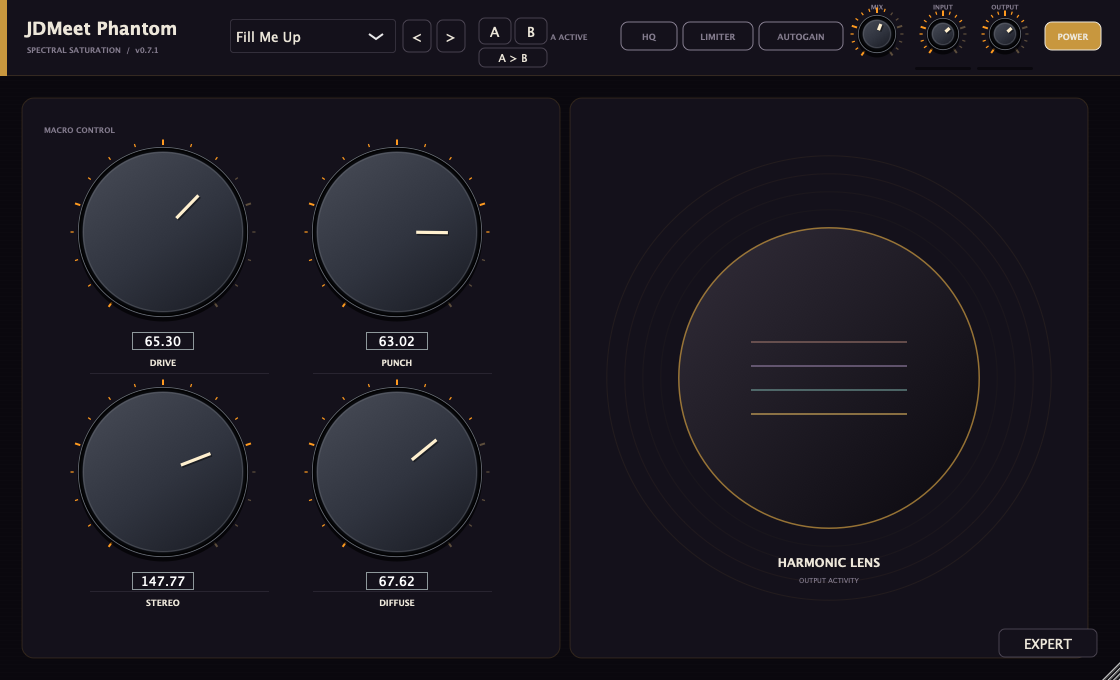
Soft, Warm and Hard saturation curves let you move from rounded harmonics to a firmer edge. Blend each band independently to keep the original attack in reach.
Punch responds to the signal envelope. Diffuse adds low-frequency density within a band — it is not a reverb. Work on body without assuming that more drive always means a better kick.
Choose normal M/S width, Haas or Spread. Narrow the low band explicitly when you want a centred foundation, and use the upper bands for width.
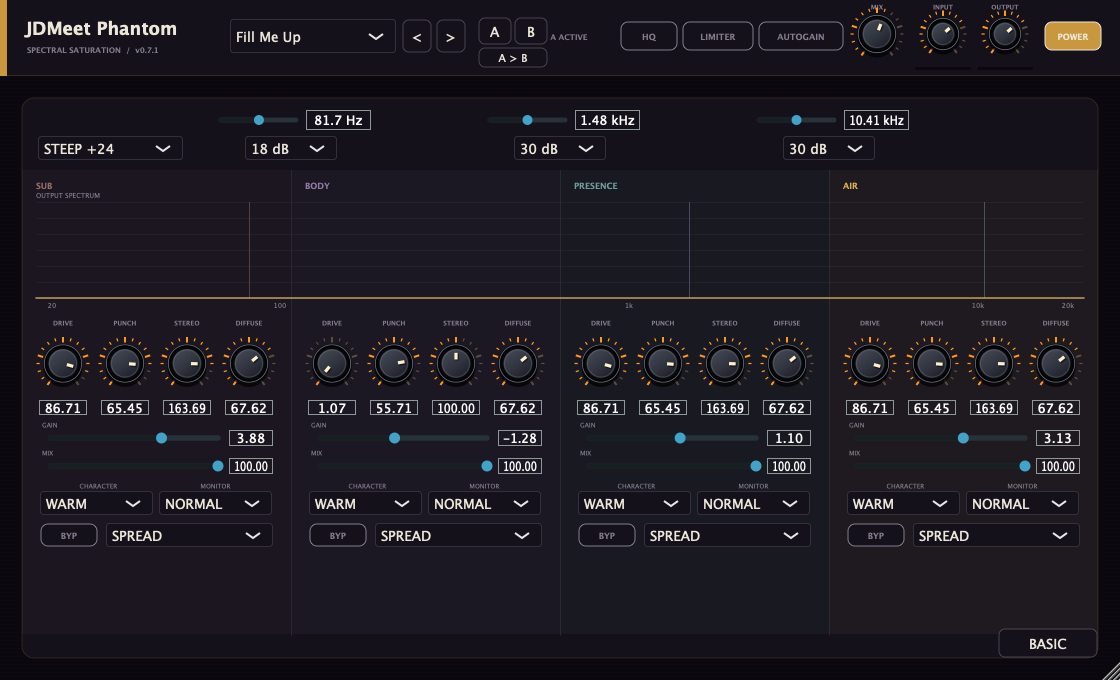
Set the crossover frequencies, change the split slope, solo a band and compare the processed band with its clean signal. A/B snapshots keep two settings ready to compare.
Start with one of 110 presets, then adjust it to the sound in front of you. The bank includes bass, drums, leads, percussion and more.
Follow the hard-techno kick workflow and compare Phantom with Crusher →
Understand Phantom’s signal path and controls → A source-reviewed guide to the four-band split, Drive curves, Punch, Diffuse, stereo modes and 4×/8× processing, with real interfaces and controlled bass, drum and mix-bus experiments.
Open Expert, solo the band containing the bass harmonics and raise its Drive gradually. Keep the lowest band gentler when the fundamental already has enough weight. Unsolo and compare in the mix at a similar output level.
Find the low-mid range carrying the body of the kick or snare. Adjust that band’s Drive and Mix, then check the attack with the full signal playing. Avoid adding high-band drive just because the low end needs more density.
In Expert, choose the normal stereo mode and narrow the low band explicitly. Apply width higher up only where useful stereo information exists. Check the result in mono; a width control cannot create the same result on every source.
For the processing differences, read saturation vs distortion vs clipping. If you want one compact drive/filter/compressor chain instead, compare JDMeet Crusher.
INSTALLATION
macOS 11+. VST3 only. Save your session and quit your DAW before installing.
/Library/Audio/Plug-Ins/VST3/JD Phantom.vst3. This updates the existing plugin instead of adding a duplicate. Leave the installer-created name unchanged: the older bundle name is intentional, while the current display name is JDMeet Phantom.Yes. This public release is free, with no signup, activation key, trial timer or periodic demo noise. Download the macOS installer directly.
macOS 11 or newer, on Apple Silicon or Intel, with a VST3-compatible DAW. This download does not include Windows, AU or AAX. Logic Pro cannot load this VST3 directly.
Expert reveals independent controls for four frequency bands, adjustable crossovers and slopes, band gain and mix, character, stereo modes and monitoring. Its spectrum shows the output signal. Changing presets keeps your chosen Basic or Expert view.
HQ switches from 4x to 8x oversampling. Both processing paths stay active for smooth switching, so switching HQ off does not reduce CPU use. Both modes report the same 65-sample latency.
A high-frequency preset may do little to a pure sub-bass note. Character needs Drive above zero; normal stereo width needs stereo information. Solo a band in Expert to hear its range, and level-match before deciding whether the processing helps.
It is a sample-peak safety clipper, not a look-ahead or true-peak limiter. Auto Gain matches average energy, not perceived loudness or LUFS. Use dedicated mastering metering when you need those measurements.
The plugin identity, parameter IDs and installation path are retained. Version 0.7.1 only changes the name to JDMeet Phantom; audio and presets match 0.7.0. Projects made with 0.6 or earlier can sound different because 0.7 changed the audio engine. Back up those projects before updating.
A branding-only update to the 0.7.0 audio engine. Processing has been checked with automated audio tests and VST3 host validation. Those tests check stability and behaviour, not whether a preset is the right choice for every track.
JDMeet Phantom is an independent effect. It is not affiliated with, endorsed by, or a verified sonic replica of Phantomic or any hardware processor.
Installer SHA-256: 99ecda707704fe4dc8ecb91bfcb1fadf4ff7c7f3850d1e45ad3ace47fd090362
TOOLS BY A PRODUCER. MUSIC FOR THE FLOOR.
JDMeet is a Hard Dance Music (HDM) DJ and producer, creating and playing hard techno, hardstyle and hardcore. Explore two releases from the producer behind these plugins.
Hard techno.
About the track →Acid bounce techno.
About the track →