JDMeet Phantom is our free four-band saturation effect for macOS VST3 hosts. This is a developer-authored engineering guide, not an independent review. We inspected the processing source corresponding to release 0.7.1 and used external engineering references for the underlying concepts. The workflows below are proposed listening experiments, not claims about measured or auditioned results on your music.
Its useful distinction is frequency-dependent control: you can treat a bass fundamental, its upper harmonics and a bright transient differently. That does not make it an automatic mastering chain, an analogue-hardware model or a replacement for corrective EQ.
1. Follow the signal before turning a knob
Phantom applies input gain, separates the signal into four bands, processes each band and recombines them. Within a band, the important order is stereo processing → Punch → Diffuse → Drive character → band gain and Mix. The order matters: a wider signal reaches the later nonlinear stages, while Punch can change the level that drives saturation.
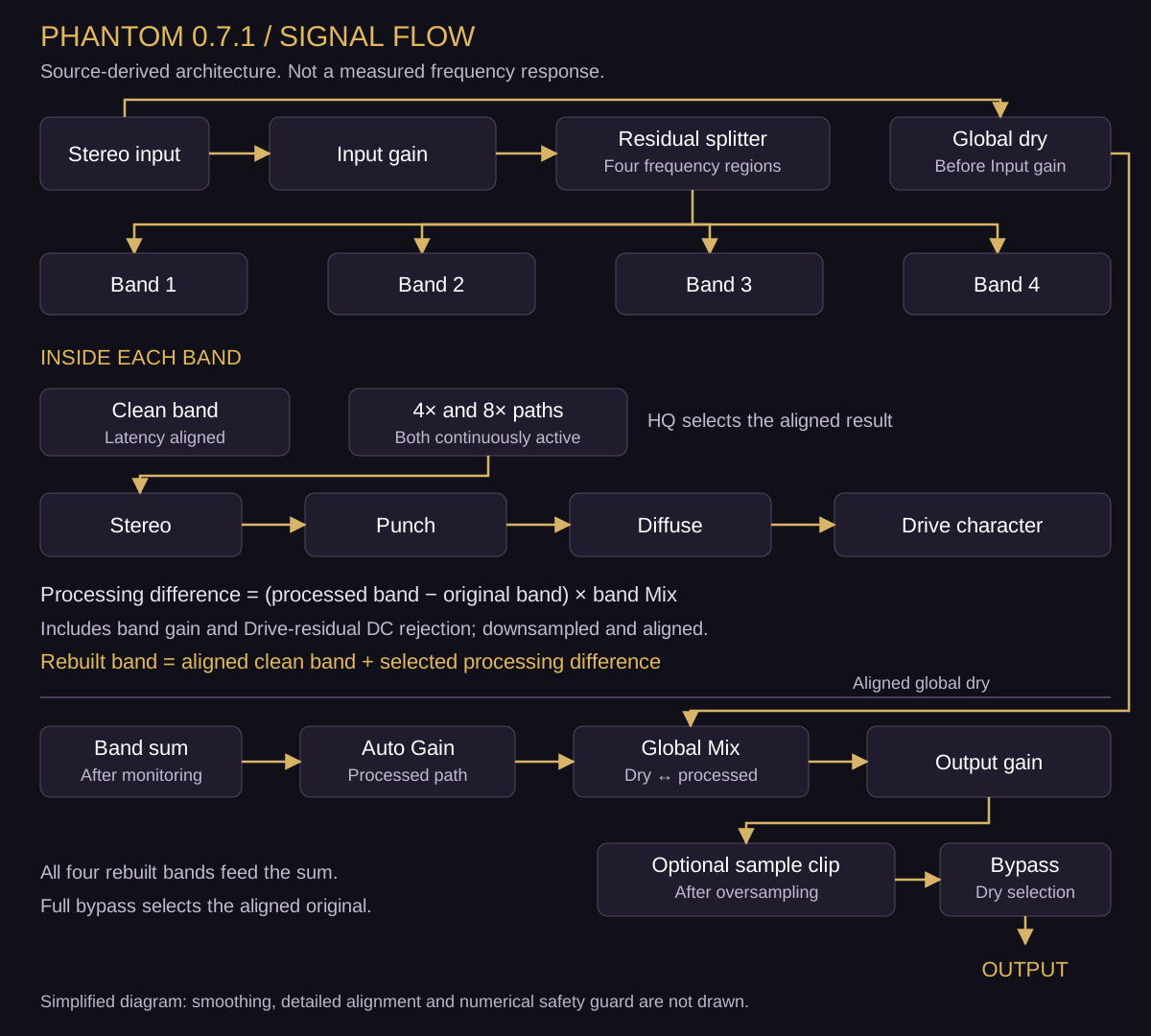
The clean-path detail is significant. Phantom does not simply blend an arbitrarily delayed effect with an immediate dry signal. It aligns the clean bands, the processing paths and the global dry signal, and reports processing latency to the host. A neutral band contributes no processing difference. This design is intended to preserve the untouched path; it does not mean an aggressively processed sound will cancel against the original.
2. Four bands are four processing regions, not four isolated instruments
The splitter uses residual decomposition. It extracts a filtered low component, subtracts that component from the remaining signal, and repeats at the next crossover. The fourth band is the final remainder. Before independent processing, the four bands reconstruct the input apart from floating-point rounding.
That reconstruction is not evidence of linear-phase crossovers. Phantom uses recursive filters for the split; FIR filters in its oversampling stage do not turn the entire plugin into a linear-phase processor. Base slope and Split Style change the separation. Their labels describe filter roll-off, not a hard wall that no audio can cross.
More importantly, splitting happens before saturation. New harmonics generated in a low band can extend above that band’s crossover; the code does not apply a second band-limiting crossover after every shaper. A soloed “Sub” band can therefore sound brighter after Drive. Bands also contain everything in that frequency region: on a drum bus, a snare body and kick overtones may share one band.
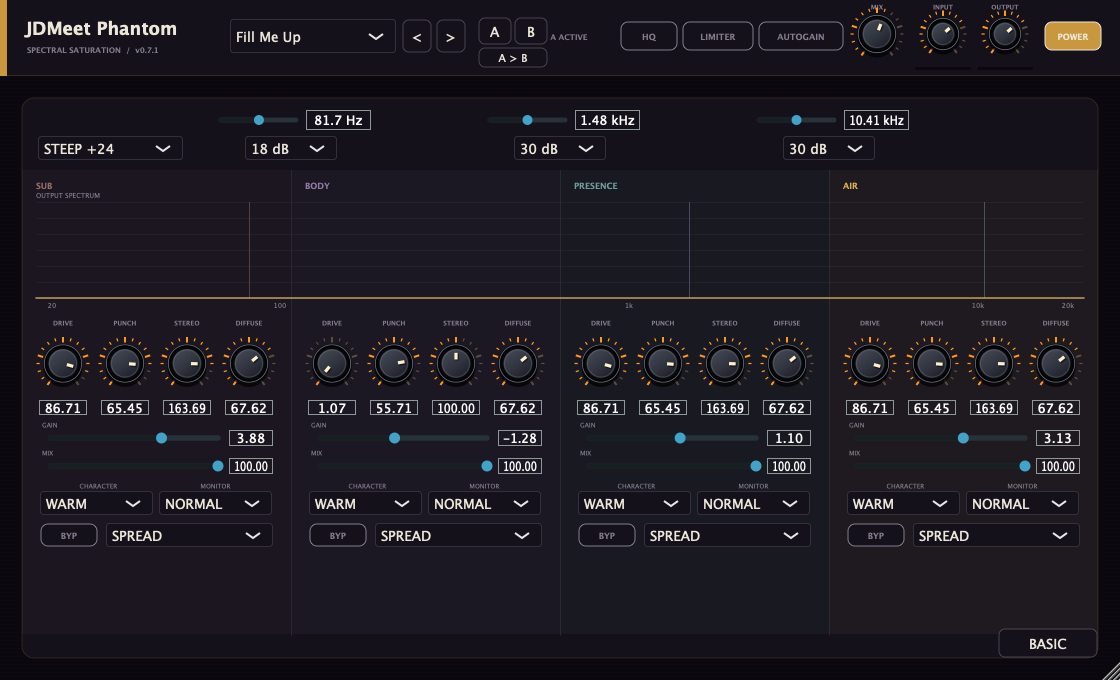
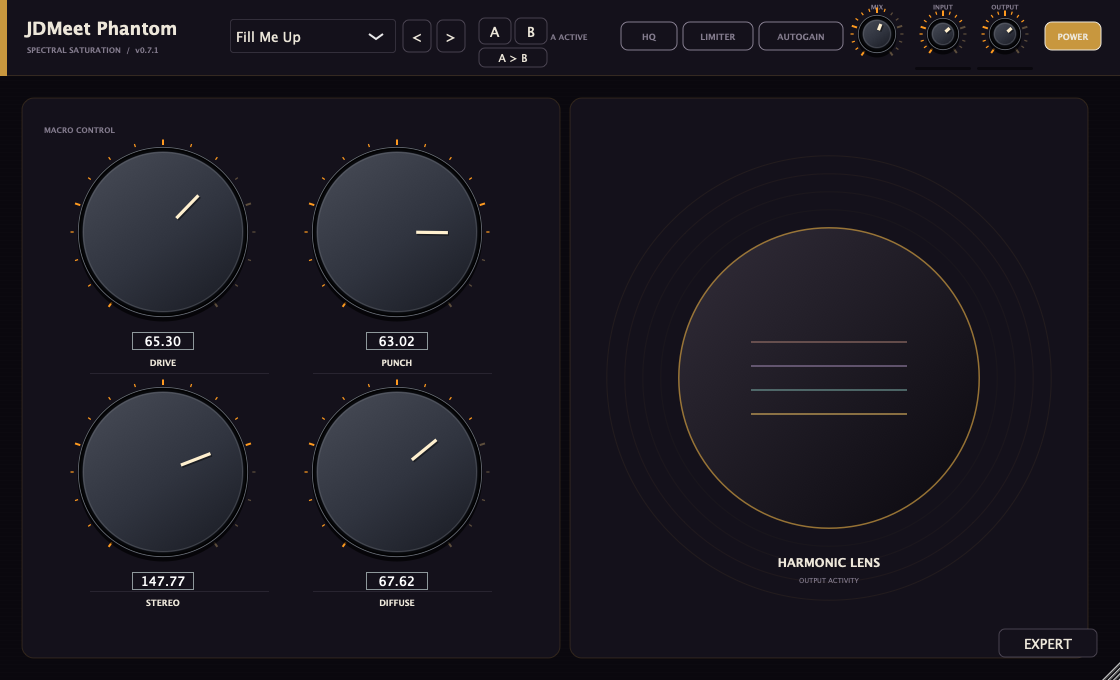
Basic and Expert are two views of the same engine. A Basic macro reflects the average of its four band values. Moving it adjusts the existing profile toward the new value rather than installing a second processor after the bands. If one band needs correction, use Expert; a Basic macro can move bands that already work.
3. Drive changes the transfer curve, not just the output level
A static EQ changes the balance of existing frequency components. A nonlinear shaper can generate additional components, so raising a shelf and raising Drive are not interchangeable. Jett Galindo explains that practical distinction in her iZotope article on exciters in mastering. Phantom-specific behavior comes from its own source, not from Ozone’s algorithms.
| Character | Implementation | What to compare |
|---|---|---|
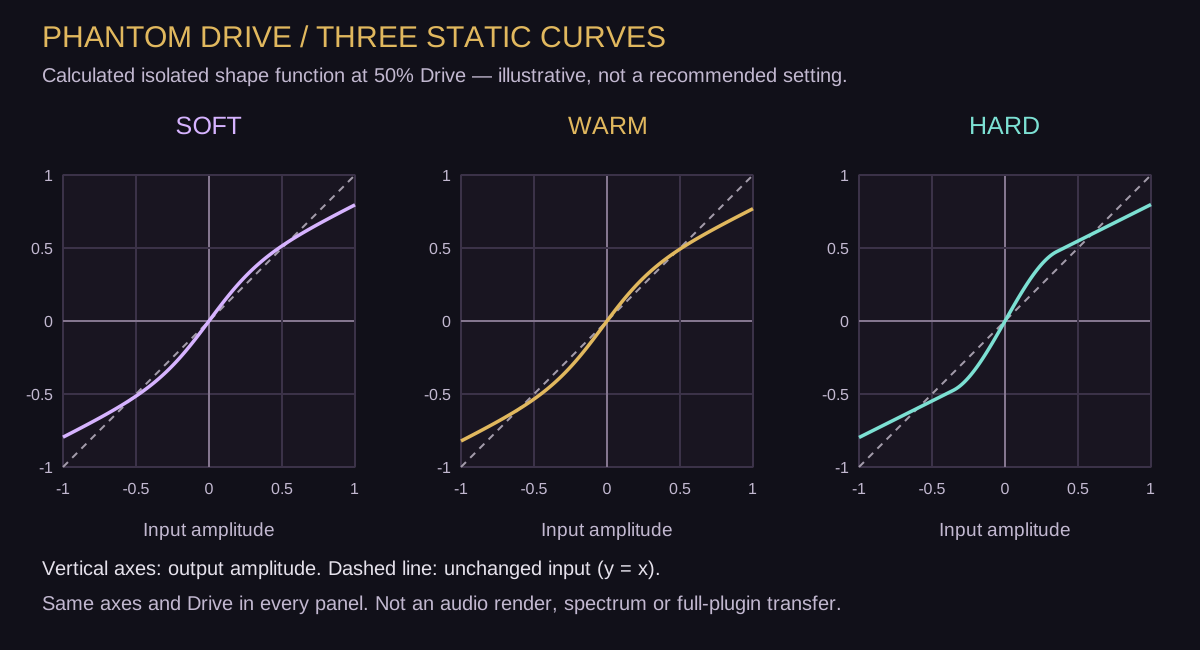
| Soft | A symmetric hyperbolic-tangent curve. | How rounded peaks and added harmonics change attack and body. |
| Warm | A biased tanh curve, with a zero-input offset correction. | Asymmetry and a different harmonic balance; not a certified tube model. |
| Hard | A bounded cubic curve with its input clamped before the polynomial. | A different knee and peak shape; the mode name does not mean a simple brick-wall clip. |
Drive controls pre-gain, partial compensation and the blend toward the shaped signal together. At zero Drive, changing Character has no effect. At higher Drive, the result depends on input amplitude as well as the knob position. Reducing Input to undo a level increase also changes the distortion. Use a downstream trim for a listening comparison.
On a bass line, listen across changing notes. Additional harmonics may help a fundamental read on a smaller playback system, but that is a hypothesis to test, not a promise of “more bass”. A setting that gives one low note definition may make higher notes abrasive. Recheck the bass against the kick and reduce the relevant band Mix if the new texture dominates.
4. Punch and Diffuse solve different problems
Punch responds to the onset
Phantom compares a faster and a slower amplitude envelope. When the fast envelope rises above the slow one, it identifies an onset and changes gain around that event. Positive Punch emphasizes it; negative Punch reduces it. The detector runs separately on left and right audio within each band.
This is not a conventional threshold/ratio compressor, and it has no external kick-trigger sidechain. There are no exposed attack and release controls for this detector. If positive Punch hits the downstream Drive harder, the added onset may be reshaped again; more Punch need not mean a taller final peak. Compare with Drive at zero first, then bring saturation back.
Diffuse changes density, not room size
Diffuse follows a smoothed body component inside the band and adds a nonlinear, tanh-based modification of it. It is not a room simulation, an all-pass diffusion network or a reverb tail. Its filter and saturation amount change with the control. It can operate even when Drive is zero.
On a kick tail, audition Diffuse while keeping Punch and Drive unchanged. Listen for whether the body becomes useful weight or masks the next event. If the tail is simply too long, edit the source envelope or arrangement; a density control cannot know where the next bass note needs space.
5. Width, Haas and Spread: know what survives mono
The underlying sum/difference representation is described in Ian Stewart’s mid/side explanation. In Phantom’s normal Width mode, the equivalent relationships before subsequent processing are:
M = (L + R) / 2 S = (L − R) / 2 L′ = M + wS R′ = M − wS w = Stereo / 100
At 100%, this width stage preserves the original stereo relationship; at 0%, it removes Side. These are control definitions, not recommended settings. Identical left and right input has no Side to amplify, so ordinary Width cannot create stereo from a perfectly mono source.
Above 100%, Haas and Spread additionally derive a Side contribution from delayed Mid audio. Haas uses one short delay; Spread uses the difference between two short delays. At or below 100%, those extra terms are inactive. The two names describe different algorithms, not a mono-safe/better switch.
Important boundary: an added Side term cancels in a simple mono sum at the width stage. But Phantom then applies channel-dependent envelope processing and nonlinear shaping. Their combined result is not guaranteed to retain the same mono sum. Check the final output in mono, including any downstream limiter.
For a centred low end, narrow the relevant low band explicitly. Phantom does not silently protect it from widening. On a lead, first confirm that the dry source is actually stereo; otherwise use Haas/Spread only as a deliberate sound-design choice and compare the hook’s audibility after mono folding.
6. What 4×/8× processing does — and does not do
Nonlinear processing can generate frequency components beyond the original Nyquist limit. Oversampling raises the internal processing rate and filters during rate conversion to reduce aliasing. JUCE’s oversampling documentation explains the mechanism and its latency implications.
Phantom 0.7.1 has 4× and HQ 8× FIR-oversampled processing paths for each band, aligned to a common reported latency. For example, a 48 kHz session implies internal rates of 192 and 384 kHz. These are arithmetic consequences of the factors, not measurements of sound quality or recommended session rates.
Both paths run continuously. The HQ switch changes which aligned result is used; switching it off is not a CPU-saving mode in this version. Nor is 8× a guarantee that every possible alias is absent. Compare sustained bright material and note changes at matched level; a change in timbre alone does not quantify aliasing.
Product boundaries matter here. Saturn 2’s documentation describes its own oversampling and linear-phase options. Those settings, factors and CPU trade-offs are not Phantom specifications. In particular, Phantom’s final sample clipper operates after the band oversampling paths.
7. Auto Gain, Mix and Limiter are not a mastering verdict
Auto Gain compares smoothed input and processed energy and applies a bounded correction to the processed signal before global Mix. It is not a K-weighted, gated programme-loudness calculation and does not target a LUFS value. A brighter result can still feel louder after energy matching. Monitoring only one band can also change what the energy comparison sees.
For a repeatable audition, turn Auto Gain off, record the same input phrase through two settings and match level with a separate post-plugin gain control. Phantom’s A/B slots are useful for recalling settings, but the comparison is not automatically loudness-matched. Bob Katz’s Level Practices, section II explains why matching peak readings alone is insufficient.
Global Mix at 0% is not the same as full bypass. Mix blends toward the latency-aligned original, but Output gain and the optional Limiter still follow it. Similarly, a band’s Mix blends its processing difference; use the dedicated monitoring and bypass controls when diagnosing a band. For a neutral starting point, use Init and verify the actual controls.
The button labelled Limiter clamps output samples to ±0.988 in this release. That is a fixed implementation ceiling, not a recommended mastering target. It is a sample-peak safety clipper without a look-ahead gain-reduction envelope or true-peak detection. Driving it harder can add new distortion outside the HQ path.
Reconstructed peaks can exceed the stored sample peaks; FabFilter’s true-peak explanation illustrates the distinction. If delivery requires true-peak control, use suitable final-stage processing and verify the rendered file. Phantom’s clipper and meters do not certify that delivery.
The Expert spectrum is a visual aid derived from a sample-by-sample dominant-channel signal. It is not separate calibrated L/R spectra, a transfer-function measurement, a correlation meter or a THD test. Use an external analyzer for those jobs. The Basic Harmonic Lens is even simpler: its animation reflects output activity, not measured harmonic partials.
8. Three experiments that can reject a bad setting
Start with moderate monitoring volume, an unprocessed reference and a recorded phrase containing the busiest passage and a note change. Keep the input file and pre-plugin gain identical. Compare one version at a time; do not sum clean and processed tracks for this test. The following are workflows to try, not supplied audio demonstrations.
A. Bass definition without blindly distorting the sub
- Load Init, open Expert and use Listen to locate the fundamental and upper content. Place crossovers around the source’s useful regions, not the screenshot’s values.
- Choose one band to process. If the source is nearly a pure sub sine, an upper band may contain almost nothing to excite: cautiously processing the fundamental band may be necessary to generate harmonics. If it is already rich, try its body/presence content first.
- Raise Drive only until the intended change is clear, compare Character, then return all monitoring to Normal. Keep the rest of the band controls fixed.
- Trim after the plugin, check the full phrase and compare on a second playback system. Keep the change only if the bass line is easier to follow without losing the kick or making upper notes rasp.
B. Drum-bus impact without mistaking density for groove
- Identify whether the problem is the onset, body or tail. Solo may locate it, but the drum bus determines whether the treatment works.
- With Drive and Diffuse neutral, audition Punch on the relevant band. Compare the first kick, a fast fill and a quieter hit; the envelope detector responds to context.
- Restore saturation gradually, then audition Diffuse as a separate decision. Re-match output after each change.
- Reject a setting if quieter details disappear, the snare moves sideways or the tail obscures the next hit. For a tail-length problem, use the hardcore kick-tail workflow.
C. Mix-bus colour before final loudness control
- Save a recoverable mix version. Put Phantom before the delivery limiter if that is where you intend to use its colour; retain the same downstream chain for comparisons.
- Start with one purposeful band change. On a full mix, every instrument occupying that region is affected. Avoid assuming all four bands need saturation or stereo enhancement.
- Match level after the whole chain for the final listening decision. Check verse/drop transitions, vocals or lead lines, mono compatibility and cymbal texture. A change that makes the downstream limiter work differently must be judged as part of that chain.
- Render and inspect loudness, true peaks and audible artifacts using appropriate tools. If clarity is reduced, remove Phantom; finishing a professional mix does not require a saturator on the master bus.
9. When Phantom belongs in a professional session
Use it when you need independent harmonic, envelope and width decisions across frequency regions, plus repeatable A/B and band monitoring. Choose a different tool when you need surgical resonance removal, external-sidechain compression, a real reverb, calibrated stereo/loudness analysis or final true-peak limiting. A processor is professionally useful because its role and limits are understood, not because every control is switched on.
For Ableton Live or FL Studio on Mac, follow the current Phantom installation guide. Release 0.7.1 is a free, signed and Apple-notarized macOS VST3 for Apple Silicon and Intel; there is no Windows, AU or AAX build on the product page. Host support and installation checks are separate from listening evaluation. Keep references for older projects: 0.7.1 retains the 0.7.0 engine, but earlier releases can sound different.
Continue with saturation, distortion and clipping, choosing Phantom or Crusher, or the Production Notes library. If a mix still needs an outside assessment after these checks, see our Mixing & Mastering enquiry page.
Sources and verification scope
Reviewed 11 September 2026. Product-specific descriptions were checked against the 0.7.1 processing, parameter and editor source; processing-file hashes match the recorded release. The diagrams and session experiments are original. We did not run new DAW listening tests for this article, and the curve figure is a calculation, not a VST3 capture. The authors and manufacturers below do not endorse Phantom.
- Jett Galindo — How to Use an Audio Exciter in Mastering, iZotope. Background on harmonic excitation versus EQ and purposeful use; Ozone settings and examples are not transferred to Phantom.
- Ian Stewart — What is mid/side processing?, iZotope. Sum/difference representation and why stereo decisions need mono checks.
- Bob Katz — Level Practices, Part 1, Digital Domain. Section II on peak readings, perceived loudness and consistent monitoring. Historical hardware recommendations are not adopted as present-day delivery rules.
- JUCE — dsp::Oversampling documentation. Rate conversion, FIR/IIR options and latency. Phantom’s factors and routing were verified separately in its source.
- FabFilter Saturn 2 — Input and output controls. A product-specific reference showing why oversampling and linear-phase claims must be scoped to the actual implementation.
- FabFilter Pro-L 2 — True peak limiting. Sample peaks versus reconstructed peaks; not a claim that Phantom includes Pro-L’s functions.
- JDMeet Phantom — official product and release documentation. Download, supported format, current release and installation notes.