Phase is a relationship; polarity is a switch
FabFilter defines phase as a position within a repeating cycle, expressed from 0° to 360°. Two equal-amplitude sinusoids of the same frequency reinforce at 0° relative phase and cancel at 180°. For a general waveform, a half-period shift is not necessarily the same as polarity inversion. Real kick layers are complex, so the usual result is partial reinforcement at some frequencies and cancellation at others.
Polarity inversion is simpler: every positive sample becomes negative and every negative sample becomes positive. It does not move audio in time. A polarity button gives only two states, while a timing or phase relationship can take many forms across the spectrum.
Why tiny moves can change the sub
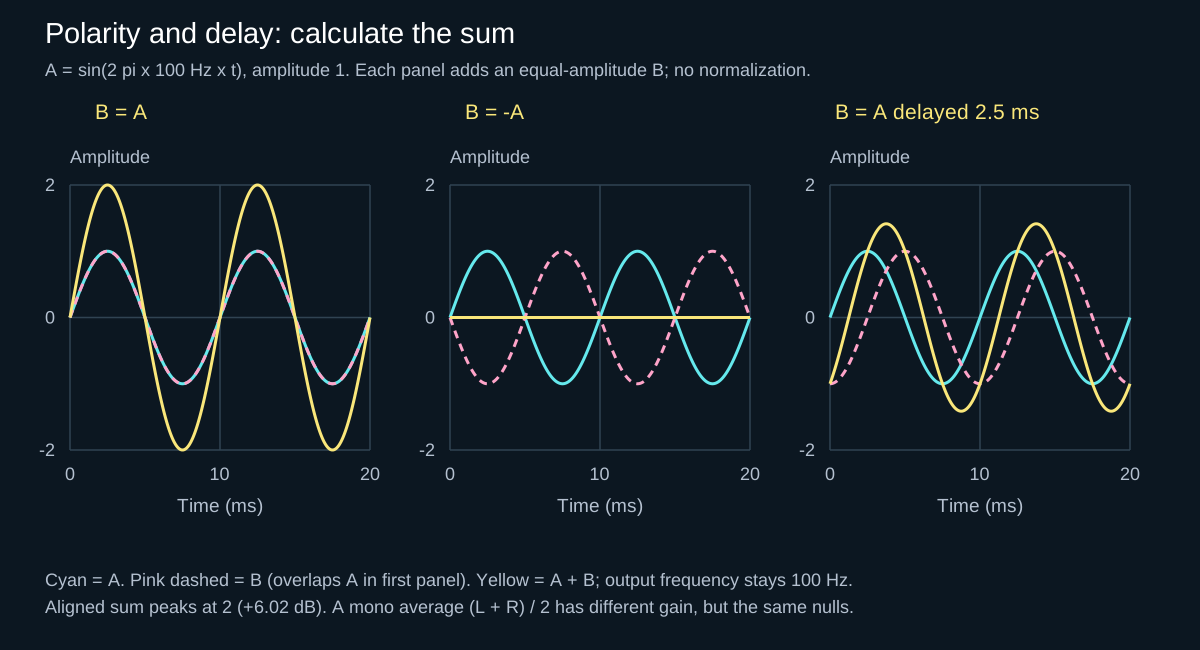
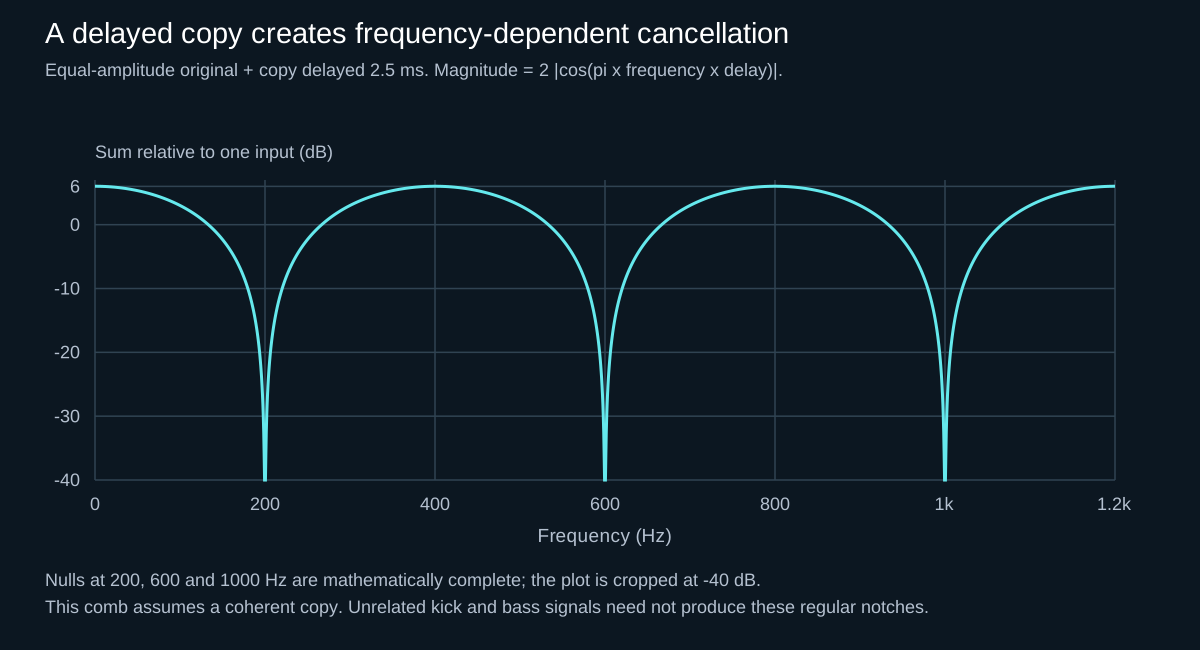
One cycle at 50 Hz lasts 20 ms; half a cycle is 10 ms. Those figures explain scale, not a setting to copy. A delay that is harmless at one frequency can cause a different phase offset at another. iZotope demonstrates that a fixed 2.5 ms delay produces 90° at 100 Hz, 180° at 200 Hz and 360° at 400 Hz. Adding a broadband signal to an equally loud delayed copy produces regular comb filtering. Two different kick layers need not have that exact comb response: cancellation depends on their coherence, spectra and relative level.
A two-tone test: inversion is not delay
Make a quiet, steady test signal containing 100 Hz and 200 Hz sines and render it once to audio. Duplicate that exact file onto two equally loud, identically routed tracks feeding one clean mono bus. Keep monitoring quiet or muted while measuring, leave headroom for the sum and disable dynamics, modulation, warping and fades in the portion being compared. Do not use two independently running oscillators: their starting relationship could change.
- Start with aligned copies. At unchanged channel levels, each frequency component of their sum has twice the amplitude of one copy. This is a routing check, not a fair loudness comparison of two musical candidates.
- Invert one copy, without moving it. The two copies should cancel throughout the identical, aligned section. In Ableton Utility, use both channel inversion controls for a stereo file; flipping only one channel is a different test. A residual calls for checking gain, routing and processing before blaming the plug-in.
- Restore polarity, then delay only the duplicate. Use 2.5 ms as an exact teaching example, not a kick-alignment recommendation. At 48 kHz this is 120 samples. Compare the steady overlap, away from file boundaries: the 100 Hz components partially reinforce, but the 200 Hz components cancel. A pure time shift has not changed the solo copy’s steady spectrum.
- Read the result relative to one unchanged copy. Use consistent analyzer settings and sufficient frequency resolution to separate the tones. The table predicts ideal component amplitudes, not the peak meter reading of the combined two-tone waveform.
| Second copy | 100 Hz | 200 Hz |
|---|---|---|
| Aligned, same polarity | 2× (+6.02 dB) | 2× (+6.02 dB) |
| Aligned, inverted | 0 (ideal null) | 0 (ideal null) |
| Delayed 2.5 ms, same polarity | √2× (about +3.01 dB) | 0 (ideal null) |
These predictions follow from adding the two sinusoids; the delayed-copy magnitude is |1 + exp(−j2πfτ)|. Our numerical tests check the same relationship with a 120-sample delay. Numerical noise, unequal gains or processing can leave a residual in an actual session. This experiment explains the diagrams; it does not establish that any real kick and bass should null, align perfectly or use this delay. See the spectrum analyzer guide if the two components are difficult to distinguish.
Where hard-techno low end goes wrong
- Layered kick bodies: two samples carry similar low-frequency cycles but start at different points.
- Kick plus rumble: a reverb or resampled tail folds back under the next kick with an unstable relationship.
- Kick plus sub: the bass note starts at an arbitrary oscillator phase or overlaps the kick body.
- Parallel processing: an unreported or uncompensated delay creates a shifted duplicate.
- Stereo widening: delayed or inverted sides sound wide but lose energy when summed to mono.
Apply the test to a hard-techno phrase
Save a fixed kick/bass phrase with a fill and at least one note change. Work on a copy of the session, keep the main kick on the grid and start before a shared compressor or clipper. Otherwise its reaction to the changing sum becomes another variable. This is a listening experiment, not a promise of a particular sound.
- Name the problem. Listen to the kick, bass and their sum. Is the body quieter, is the attack harder to hear, or does the bus processor turn everything down? Muting a source reveals a conflict but does not by itself prove phase cancellation. For masking, compare the EQ diagnosis workflow.
- Save a polarity-only candidate. Flip only the supporting layer and change nothing else. Check every hit and note. A result that helps one pitch but harms the next is evidence against a permanent binary fix.
- Save a timing-only candidate. Restore the reference polarity. Zoom into the body cycles and move only the supporting layer in small increments. Do not assume that lining up the first visible peaks aligns the whole changing waveform. Stop if the move improves weight but creates a flam, weakens the click or changes the intended groove.
- Compare both with the untouched reference. Match apparent loudness after the clean summing bus, leaving the individual layer gains unchanged. Judge the same phrase in mono and stereo, then restore the shared processing for a separate final check. The gain-staging guide explains why turning down a distorted output does not undo earlier overload.
- Choose by role, not the largest meter reading. Listen for an identifiable kick attack, stable body across notes and a tail that supports the next beat. If neither candidate is consistent, compare a shorter envelope, different tuning or a different layer from the original balance. The kick and bass guide covers those arrangement choices.
Sum gain is not the same as cancellation
Two identical amplitude-1 signals added without normalization produce amplitude 2, or +6.02 dB relative to one signal. A monitor that averages (L + R) / 2 compensates that gain. Exact opposite-polarity copies cancel in either convention. Compare mono modes at sensible levels; do not mistake a monitor’s summing gain for an alignment improvement.
Check the whole pattern and the mono sum
A phase relationship can improve one kick and fail on the next if a free-running sub oscillator begins at a different point. Test multiple hits, fills and note changes. Then monitor in mono. iZotope’s correlation guidance treats sustained negative readings as a warning of mono-compatibility problems, while brief dips are not automatically a fault. The meter directs attention; the mono audition decides whether musical information actually disappears.
Do not reach for linear phase by default
FabFilter notes that ordinary minimum-phase EQ changes phase around the affected frequencies, while linear-phase processing trades that behavior for latency and possible pre-ringing. On a sharp hard-techno transient, pre-ringing may soften the very edge you want to protect. Use the mode whose artefacts are least damaging in context; “linear” does not mean universally better.
Three mistakes the diagram cannot fix for you
- Chasing perfect cancellation between different sounds. The exact null requires identical, equally loud copies with opposite sign. A pitched kick and a changing bass line do not meet that condition.
- Confusing one channel with a whole layer. Inverting both channels changes a stereo layer’s polarity relative to another layer. Inverting only left or right changes the layer’s own mono sum as well. Document which operation you tested.
- Forcing the correlation meter to +1. A stereo correlation meter compares left with right; it does not directly measure the relationship between two centre-panned mono layers. Such a bus can read +1 while the layers partly cancel. Intentional width also need not read +1. Listen for lost musical information rather than optimizing the display.
How the references fit together: Mike Ardagh’s FabFilter lesson explains the cycle relationship; Nick Messitte’s iZotope article distinguishes delay, phase and the situations where intervention is useful. Ableton documents the actual channel switches and mono controls. Pro-Q’s manual describes a different decision—the trade-offs of EQ processing modes. None supplies a universal alignment value. JDMEET’s practical conclusion is to keep the rhythmic reference fixed, test one change at a time and reject a correction that only works on the isolated hit.
If two low-end layers only sound powerful in solo, the arrangement has not gained power—it has hidden a conflict.
Sources and further reading
The FabFilter Learn lessons below may ask you to sign in. For open references, use iZotope’s phase explanation, Ableton’s Utility manual for the channel controls, or the Pro-Q manual for EQ-mode trade-offs. The practical tests on this page are self-contained and do not require access to those lessons.
- FabFilter Learn — Phase: What is it and why does it matter? (sign-in may be required)
- iZotope — What is phase in audio? Five ways to address phase issues
- Ableton Live 12 Manual — Utility, channel inversion and mono controls
- FabFilter Pro-Q 4 Manual — Processing modes and their trade-offs
- FabFilter Learn — Linear phase EQ and pre-ringing (sign-in may be required)
- iZotope — Mono, stereo and phase cancellation