The difference is behavior, not quality
A static EQ band applies the same gain curve while its settings remain fixed. If a distorted kick has a broad, persistent boxy tone, a small static cut can improve every hit. In designs with independent gain and dynamic range, a band can retain a static cut or boost while a level-dependent contribution moves around that baseline. Other designs define a dynamic endpoint instead; check the version-specific comparison below. Threshold, knee, range, detector routing and timing determine the movement; soft-knee action can begin below the nominal threshold.
FabFilter describes dynamic EQ as gain that changes with the level of the input signal. Its Pro-Q bands can use compression or expansion, an automatic or manual threshold, attack and release, and an external side chain. That makes dynamic EQ closer to frequency-selective level control than to an automatic “better EQ.”
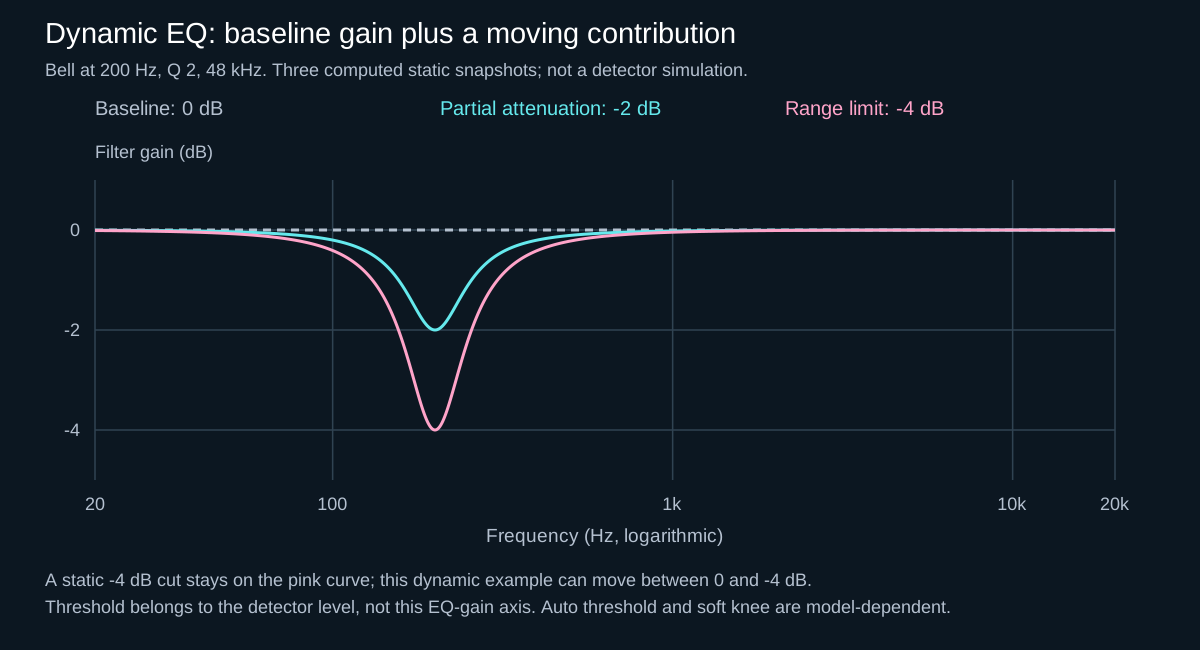
Read the illustration as three calculated filter responses, not a recording of a band moving in time. Its 200 Hz centre, Q of 2 and −4 dB limit are teaching examples, not a kick preset. A threshold describes the detector level; it cannot be read from the EQ-gain axis. For those display distinctions, see what a spectrum analyzer can and cannot establish.
Start with one diagnostic question
Does the frequency problem exist most of the time, or only during particular events?
If it remains while the sound plays, try arrangement, source choice, level, envelope or static EQ first. If it appears only on the kick, only in the loudest tail, or only when two layers overlap, dynamic EQ may solve the event without thinning everything between events.
For filter shapes and bandwidth, start with EQ fundamentals: frequency, gain and Q, then use the comparison below to decide whether the correction needs to move over time.
When static EQ is the cleaner answer
- A rumble is permanently too dark or too bright. Shape the source or use a broad static shelf; a moving band adds complexity without solving a moving problem.
- A percussion layer has an unwanted resonance on every hit. A modest static bell can remove it consistently. If only the hardest hits ring, then test dynamic control.
- Two sounds occupy the same role by design. First change octave, sample, envelope, rhythm or level. EQ cannot rescue every arrangement conflict.
- You want a deliberate tonal identity. A broad boost or cut can be part of the sound, not merely repair.
Static processing is also easier to audit. You can bypass one band and hear a stable before/after difference. In a dense 180 BPM drop, that simplicity matters.
When dynamic EQ earns its place
Kick-triggered room in the bass or rumble
iZotope’s frequency-masking guide distinguishes wideband sidechain ducking from dynamic EQ: dynamic processing can attenuate the conflicting frequency region when the kick hits. An EQ bell has finite slopes: it does not isolate one mathematical frequency or leave all neighbouring frequencies completely untouched. Put the dynamic band on the bass or rumble, feed the kick into the external side chain, and target the area where the kick loses definition—not an assumed universal low-frequency band.
Begin with a shallow range and time the recovery to the groove. Listen for a clearer kick without an audible hole or pumping tone. The exact frequency, range, attack and release are starting points that depend on the kick tail, bass envelope and tempo.
If the whole bass needs to move, compare this with the kick-triggered sidechain compression workflow, which covers routing and recovery.
A hardcore kick tail that blooms only on loud notes
A pitched, distorted tail may be controlled on most hits but overbuild when its envelope, note or distortion excites one resonance. A static notch can hollow every hit. A dynamic bell can wait for the bloom, reduce it, then release. Solo the band only to locate the problem; set the final range in the full mix.
To check pitch movement and decay before adding a band, follow the distorted hardcore kick-tail guide.
Rides or distorted tops that become painful in the drop
If the top end is balanced in the intro but harsh when the kick, ride and distortion stack, a dynamic high shelf or bell can respond only to the dense moments. Compare it against automation: if the same section always needs the same change, automation may be clearer and more predictable.
The sound being processed is not necessarily the trigger
For kick-triggered bass correction, the bass passes through the EQ; a separate kick feed tells the detector when to move it. Filtering that feed changes sensitivity, not the audible kick’s tone. The audible band and detector filter can cover different regions when the processor supports independent detection. Verify those two paths before deepening a cut.
In Pro-Q 4, a visible external spectrum confirms that the feed reaches the plug-in, but does not by itself select it as a dynamic band’s trigger. Complete the host routing and select external triggering for the band. Use the detector audition briefly if needed, then turn audition off. The official external-sidechain instructions show the host-specific routing. If a mute or solo also disables a send, use the send level or an independent test trigger to isolate the detector instead.
Threshold, range and timing without preset worship
- Set frequency and Q by listening. Use band solo briefly, then return to context. A very narrow band can sound artificial when the real problem is broad.
- Use range as a safety boundary. Start with a small maximum change. Increase it only if the clash remains audible.
- Place threshold by watching activity, not copying a number. It should react to the offending events and remain calmer when they are absent.
- Time the motion. Faster attack catches the start; slower attack can preserve bite. Release should recover without fluttering or changing the groove.
- Level-match the result. A quieter version can seem cleaner simply because it is quieter.
FabFilter notes that its automatic behavior is program-dependent: attack, release and knee respond to the audio, frequency range and dynamic range. That is a reminder that identical knob positions across different plug-ins do not guarantee identical motion.
Similar labels do not guarantee the same behaviour
In Pro-Q 4, 50% attack/release retains its automatic timing, not a specified millisecond value. Its manual warns that collapsing the expanded dynamics panel returns the band to automatic behaviour. Save the setting and use the dedicated dynamics bypass for comparison; do not assume hiding that panel preserves a custom setup.
Compare that with the explicitly versioned Neutron 4 manual: its advanced panel can be minimized with active controls retained, indicated in orange. With a negative node and Down triggering, the documented response moves from zero gain toward the node’s cut. This is not the same control layout as independently setting Pro-Q’s static gain and dynamic range. Check the manual for your installed release rather than carrying either model into every EQ.
External side chain versus self-triggering
Self-triggering is useful when the sound’s own energy creates the problem: an occasional tail resonance or cymbal spike. External side-chain triggering is useful when another sound causes the conflict: a kick masking bass, or a vocal needing temporary space in a synth.
Do not assume the trigger must be broadband. Pro-Q filters the trigger around the band by default and also offers freer side-chain filtering. The goal is stable detection of the audible event—not a meter that moves constantly.
Dynamic EQ, multiband compression or automation?
- Dynamic EQ: useful when one targeted frequency area needs level-dependent control.
- Multiband compression: useful when a wider range needs independent envelope control, but crossover behavior and band interaction require care.
- Automation: useful when the change follows arrangement rather than signal level.
- Wideband sidechain: often simplest when the whole bass or rumble must move out of the kick’s way.
Experiment: separate tonal correction from movement
Save a copy of the session. Choose a phrase containing a strong kick/bass overlap, a fill and a gap between kicks. Keep its audio, faders, processing order and monitoring fixed. Use one EQ instance or mutually exclusive snapshots—do not play duplicated bass tracks together. The following experiment assumes a processor with separate baseline gain and dynamic-range controls; adapt the states, not the numbers, for another design.
- A — no correction. Bypass only the test band and identify the audible problem. Do not bypass unrelated EQ bands or the entire mix chain.
- B — baseline only. Enable the band with its dynamic contribution bypassed. Make a restrained static adjustment if it genuinely helps. Keep frequency, Q and this baseline unchanged for the next state.
- C — baseline plus dynamics. Enable a shallow negative dynamic range and select the intended kick trigger. Compare B with C at similar listening loudness using output compensation after the EQ. This isolates the benefit of movement more closely than comparing a deeply cut static band with a lightly moving band.
- Check the detector independently. In external-trigger mode, temporarily stop only the detector feed while the audible kick and bass remain. After recovery, the band should approach its baseline. Continued movement suggests another detector source, automation or an incomplete routing change; a long release also needs time to recover. Restore the feed afterwards.
- Judge the whole phrase. Does C improve kick definition at the collision, retain bass weight in the gap and handle the fill without a new hole? Compare against a simpler bass-level or envelope change before keeping the extra dynamics.
Place loudness compensation after the detector tap when possible: changing an input or a post-fader sidechain send can change how often the band triggers. The input-versus-output gain guide explains why moving a trim changes more than monitoring level. These are suggested listening checks, not a claim that this session or any named plug-in was measured here.
Watch for over-processing: triggering on every hit is not inherently wrong—ducking every kick can be intentional. Check whether the gain movement solves a problem within each hit, and whether unnecessary reduction persists between events; an excessive range makes the timbre wobble; an ultra-fast release can chatter on distorted material. Motion should support the record, not advertise the processor.
When the band moves but the mix gets worse
- There is a notch even with no trigger: inspect baseline gain, other bands and any static EQ downstream before changing threshold.
- The kick is visible but the band does not react: verify external band triggering, detector filtering, threshold, nonzero dynamic range and the direction of gain change. An analyzer overlay alone does not establish that control path.
- Only a few bass notes disappear: compare their timing, pitch and level against the kick. If a phase/summing relationship is responsible, more EQ is not a diagnosis; start with the kick/bass low-end checks.
- The solo sounds clean but the groove is thin: reduce the range or remove the band and reassess the musical roles. Spectral overlap is not automatically an error.
What we take from the sources
Nick Messitte’s iZotope masking guide starts from which part should remain perceptually clear, whereas the Pro-Q and Neutron manuals describe the controls that implement a decision. Their panel and gain conventions differ; they do not establish one universal interface workflow. Our JDMEET conclusion is to keep those jobs separate: choose the musical priority, prove the detector route, then compare baseline tone and dynamic motion independently.
If the low-end decision still changes from section to section, the Mixing & Mastering page explains how to send the mix and describe the exact collision you want reviewed.