Start with the exact release, not the product name
The release reviewed here is 0.1.5, published on 9 September 2026. The product release notes are the current download reference; this article records a dated inspection of one particular package. An old filename, a remembered preset or a previous successful scan cannot identify the binary now being distributed.
Crusher is an independent distortion and saturation effect with Tube and Mech drive, filtering, compression, dry/wet mixing and 22 presets. It is not a bit-depth or sample-rate reduction effect. The initial scaffold is attributed to the MIT-licensed CrushClone project by doxiedevops, subsequently adapted by North Growth Lab. That project’s other formats and compatibility claims do not automatically apply to JDMeet Crusher.
The familiar control relationships motivated the build. However, matching a preset’s parameter values does not establish matching algorithms or identical sound. JDMeet Crusher has its own identifier, so it does not automatically replace CamelCrusher in old projects and is not affiliated with Camel Audio or Apple.
The feature map above separates jobs to audition. It is not an experimentally verified routing graph or an image of the interface. The social-preview cover is concept artwork, not a plug-in screenshot.
A VST3 bundle has several kinds of identity
Steinberg’s macOS bundle specification separates the executable, resources and metadata. In this package, the executable is inside JDMeet Crusher.vst3/Contents/MacOS/; Contents/Info.plist carries the bundle version and identifier. The installer has its own package metadata and signature.
Inspection found both arm64 and x86_64 executable slices. That is the scope of “universal” here: two Mac CPU architectures, not every operating system or plug-in format. The published product targets macOS 11+ and VST3 hosts; this download contains no Windows, AU or AAX edition. A supported-OS claim is also distinct from testing every supported OS release.
The actual 0.1.5 interface
This is the editor from the VST3 inside the public 0.1.5 installer, not a redrawn panel. On 13 September we downloaded the package, matched its complete SHA-256 to the release record below, checked its trusted installer signature and notarization result, and extracted it into a temporary folder without installing it. A separate local host loaded that exact VST3 and opened British Clean; no audio device or playback was started.
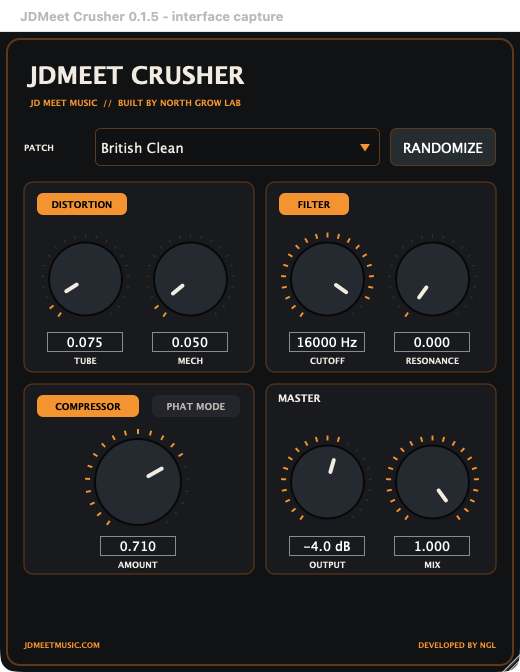
Use the controls to separate decisions: Tube and Mech for drive character, Cutoff and Resonance for filtering, Amount for compression, and Output and Mix for level and blend. Phat Mode is a switch, not another Amount knob. The values in this preset are not a neutral bypass or universal starting settings. This capture confirms the displayed editor state in that host; it does not establish sound quality, latency, installation success or compatibility with every DAW.
What we actually checked on 10 September
We compared the public download with the local release archive and inspected the extracted bundle on macOS 26.6.2. Extraction did not install the plug-in, launch a DAW or change an existing session. These are package checks, not a new listening or host-compatibility report.
| Check | Observed result | Limit of that evidence |
|---|---|---|
| Public download vs local archive | HTTP 200; byte count and SHA-256 match | Not an installation, identity or audio test. |
| Installer metadata and bundle Info.plist | Both report 0.1.5 | Version labels alone do not establish identical bytes. |
| Executable architecture / lipo | x86_64 and arm64 slices present | Does not prove both slices ran in a DAW. |
| Installer / pkgutil --check-signature | Developer ID Installer signature; trusted by Apple notary service | Not a claim about every machine's first-open result. |
| Installer / stapler validate | Stapled ticket validation succeeded | No fresh offline installation was performed. |
| Extracted bundle / codesign --verify --deep --strict | Valid on disk; designated requirement satisfied | Integrity verification does not execute or judge the DSP. |
Reviewed file: JDMeet-Crusher-v0.1.5-macOS.pkg
Size: 3,277,594 bytes.
SHA-256: 4c66bc033d74e4fac0a514bd9a651d8320952658fecabba4e41e44531eef9dde
A checksum match shows that the compared bytes match; it does not by itself prove authorship or safety. Apple describes Developer ID checks as identifying the signer and detecting alterations. Notarization adds a known-malware check. Neither is an Apple endorsement of the sound, and a normal first-open approval can still appear.
To repeat the two read-only installer checks, run shasum -a 256 followed by the downloaded file’s quoted path, then pkgutil --check-signature with that same path. Compare the complete hash and release version. If the file or trust result differs, stop and check the official release; do not strip quarantine or disable system protections to make a test pass.
Keep historical audio reports separate
The earlier version of this article described a reconstructed 0.1.4 build, including a pluginval run and render comparisons. Those are historical development results, not fresh results for 0.1.5. The earlier report also raised a dry/wet latency concern. This package inspection neither reproduces that concern nor establishes that it has been fixed.
The 0.1.5 release notes describe smoother control transitions and a continuous Mech clipping knee. They warn that strong Mech settings may be quieter or sound different from 0.1.4 despite preserved preset parameters. Treat those as developer release notes, not a measured sonic improvement from this article. Keep backups and reference renders before updating important sessions.
Tracktion’s pluginval tests plug-in stability and host interactions. Its higher strictness levels include exercises such as parameter fuzzing and state restoration. A passing run applies to the tested build and configuration; it does not establish perceptual quality, equivalence to another processor or compatibility with every DAW. We did not rerun pluginval or audio regression tests for this review.
Host scanning: Ableton and FL Studio are not identical
The developer reports successful installation and loading in Ableton Live and FL Studio 26 on macOS. That report is separate from the package checks above. For ordinary installation help, use the Crusher installation and troubleshooting guide; this section explains which variables a release test should record.
- Ableton Live: its macOS guide lists standard system and user VST3 folders and the Plug-In Sources setting. Native Apple Silicon Live requires Apple Silicon VST code. An Intel-only binary and a disabled VST3 source are different problems.
- FL Studio: Image-Line recommends Find installed plugins with Verify plugins, plus Rescan Previously Verified Plugins after updates. It documents Intel VST bridging in native Apple Silicon mode. Therefore, “all native hosts reject Intel VSTs” would be an incorrect generalization.
- Both: record the exact DAW and macOS versions, CPU/runtime mode, plug-in version, sample rate and buffer size. A bundle containing both architectures does not prove that both execution paths were exercised.
A controlled kick-and-bass session check
This is a proposed practical experiment, not an executed benchmark. Use a copy of a hard-techno or hardcore session and a short phrase containing the main groove, a fill and a gap. Keep monitoring comfortable. Choose your normal session rate and buffer first; only change one test variable at a time.
- Establish the reference. Save a dry render and note the host, version and settings. Keep the kick and bass on separate channels so a processor problem is not confused with their existing interaction.
- Separate character from level. Audition Tube and Mech independently with compression out of the comparison initially. Adjust output for a comparable listening level. Listen for the kick’s leading edge, tail texture and space before the next hit. The gain-staging guide separates input drive from output matching.
- Inspect blends. Compare dry, wet and an intermediate Mix setting in mono. An unexpected hollow blend deserves investigation: level, filtering, timing and distortion can all change the sum. A null or hollow sound alone does not diagnose uncompensated latency. See phase versus polarity before moving audio to compensate.
- Exercise transitions. Move one control slowly, then try the intended automation. Listen for isolated clicks, unexpected level jumps and tails cut off at the phrase boundary. Repeat with filter, compression and Phat separately instead of masking one change with another.
- Check recall. Save a new project copy, close it and reopen it. Compare the restored controls and a fresh render against the saved reference. Repeat at another buffer or sample rate only after the baseline works. Record differences rather than labelling every difference a failure.
Our production criterion is practical: the intended character survives level matching, the phrase still grooves, and the session recalls predictably. A safe installer cannot answer those questions. For the sound-shaping distinctions, continue with saturation, distortion and clipping.
Four shortcuts that create misleading claims
- “HTTP 200 means it installs.” It only confirms that a request received a successful response. Inspect the file, then test installation separately.
- “Notarized means audio-validated.” Distribution trust and signal behaviour are separate checks.
- “Same preset means identical sound.” A changed transfer function can produce a different output from unchanged control values.
- “The old test still covers the update.” Attach results to an exact artifact and configuration. Keep historical findings visible, but do not silently transfer them to a new binary.
JDMEET’s conclusion: ship identifiable releases, keep evidence dated and make limits visible. Version 0.1.5 passed the package checks shown here, and its real interface is now documented above. Wider host coverage, audio regression and dry/wet latency remain separate work; this article does not certify them.
Sources and further reading
- Apple Support — Safely open apps on your Mac: the scope of signature, notarization and first-open checks.
- Steinberg — VST3 plug-in format structure: bundle contents, not a host-compatibility certificate.
- Tracktion — pluginval documentation: stability tests, strictness and reproducible logs.
- Ableton — AU and VST plug-ins on macOS: locations, sources and native architecture.
- Image-Line — Installing plugins: verified scans, update rescans and runtime modes.
- doxiedevops — CrushClone: attribution for the original MIT-licensed scaffold, not proof of JDMeet compatibility or sound equivalence.