Shape the sweep
CUT offers high-pass, low-pass, band-pass and notch recipes. Each preset sets a different response, rather than changing only its name.
TRANSITIONS / HARD DANCE / RAVE
Move a phrase towards the drop with one Intensity control. Twelve transition presets combine filtering, echo, space, pitch and rhythmic movement for hard techno, hard dance and rave.
Download for MacMade by JDMeet. Discover the music →
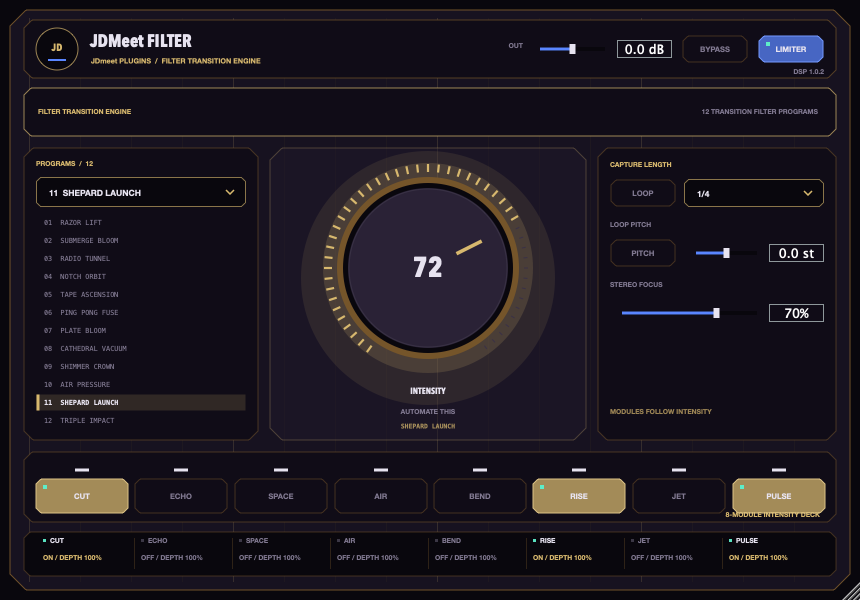
CUT offers high-pass, low-pass, band-pass and notch recipes. Each preset sets a different response, rather than changing only its name.
Switch CUT, ECHO, SPACE, AIR, BEND, RISE, JET and PULSE independently. Their level controls let you adjust a preset to the material playing through it.
Draw an Intensity ramp in your DAW. Frequency and level changes are smoothed; returning to zero restores the dry signal after a short release.
Load Filter on an audio channel or bus, choose a preset and start at zero Intensity. Play the track, raise Intensity and disable any modules you do not need. Automate the same control for the transition.
AIR is an input-following filtered-noise effect, not a high-shelf EQ. Turn AIR off when you want a sweep without added noise. RISE adds tonal layers. These are deliberate effects; they should not sound on an initially silent input.
Choosing between tonal correction and a transition? Read corrective EQ versus a creative filter sweep, including a controlled CUT-only listening exercise before you add other effect layers.
INSTALLATION
macOS 11 or newer, Apple Silicon or Intel, and a VST3-compatible DAW such as FL Studio or Ableton Live. This download does not include Windows, AU or AAX; Logic Pro does not load VST3 directly.
/Library/Audio/Plug-Ins/VST3/JDmeet Filter.vst3. This updates the same plugin instead of creating another identity.This update smooths performance-control transitions and removes the limiter’s previous automatic gain increase. The limiter is a sample-peak guard, not a true-peak mastering limiter. Filter also uses a quieter, input-following AIR layer.
Audio regression and VST3 host tests check defined behaviours and stability. They do not guarantee that every preset suits every track or that every version of every DAW has been tested.
Installer SHA-256: 2a261bbd6cb075c2767b260cdcb547cf4046ed71890e58dfce7122d89bccfbdc
Want rhythmic repeats instead of a filter sweep? JDMeet Stutter captures your track for tempo-synced fills.
TOOLS BY A PRODUCER. MUSIC FOR THE FLOOR.
JDMeet is a Hard Dance Music (HDM) DJ and producer, creating and playing hard techno, hardstyle and hardcore. Explore two releases from the producer behind these plugins.
Hard techno.
About the track →Acid bounce techno.
About the track →